
Summary
The article describes the process to modify the ORA_Managed.config for custom Oracle connection requirements. InfoBurst uses the Oracle Managed Data Access driver for Oracle connectivity. ORA_Managed.config can be modified to include custom connection settings. Consult your Oracle DBA for details about modifying ORA_Managed.config.
Recommendations
InfoBurst Updates
This process involves manual modification of the ORA_Managed.config file and related .config files. The InfoBurst update process will replace any modified files with default files and any modifications will be lost. You must document these modifications and repeat them following each InfoBurst update.
Testing
Modifications to ORA_Managed.config should be fully qualified in a non-production environment to ensure changes do not adversely affect an Oracle repository connection or any existing Oracle Database Connections.
Update Config Files
Stop the InfoBurst service and then proceed with the instructions below.
Original Config Files Backup
Locate the 14 files listed below which are located in the InfoBurst application root folder (default = C:\Program Files\InfoSol\InfoBurst). Back up the files to a folder outside the InfoBurst application root folder and label the backup folder INFOBURST-CONFIG-ORIGINAL:
IBCatalog.exe.config
IBConfig.exe.config
IBDeliver.exe.config
IBEServer.exe.config
IBExec.exe.config
IBGenerate.exe.config
IBMaint.exe.config
IBRun.exe.config
IBServerConsole.exe.config
IBXBuild.exe.config
IBXExec.exe.config
IBXGenerate.exe.config
IBXRun.exe.config
ORA_Managed.config
Edit Config Files
The first 13 files listed above contain pointer entries to ORA_Managed.config where those entries are commented out:
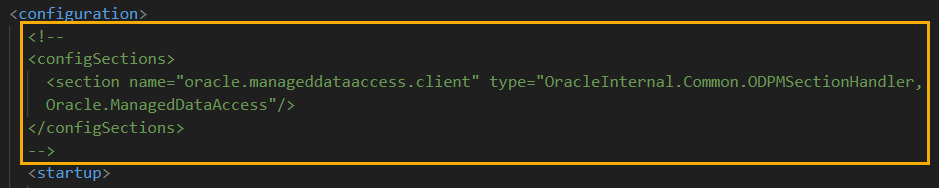
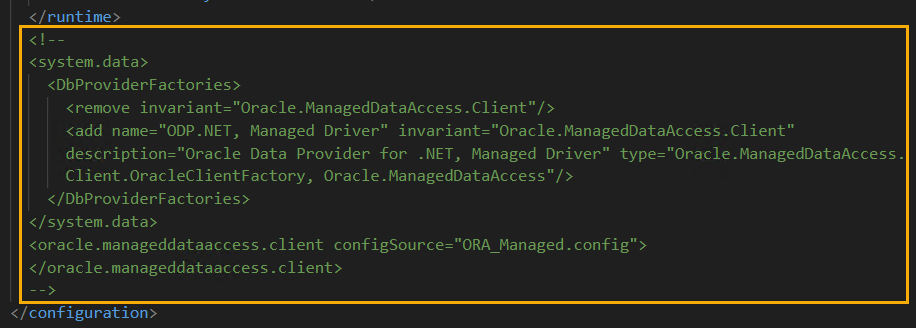
For each of the files listed below:
- Open the file in a text editor
- Locate the two commented sections highlighted above
- Uncomment each section (remove <!-- and -->)
- Save the file
IBCatalog.exe.config
IBConfig.exe.config
IBDeliver.exe.config
IBEServer.exe.config
IBExec.exe.config
IBGenerate.exe.config
IBMaint.exe.config
IBRun.exe.config
IBServerConsole.exe.config
IBXBuild.exe.config
IBXExec.exe.config
IBXGenerate.exe.config
IBXRun.exe.config
Edit ORA_Managed.config
- Open ORA_Managed.config in a text editor
- Modify the file with any required changes and save the file
- Start the InfoBurst service